 TonyBot$TONY · live
How TonyBot works
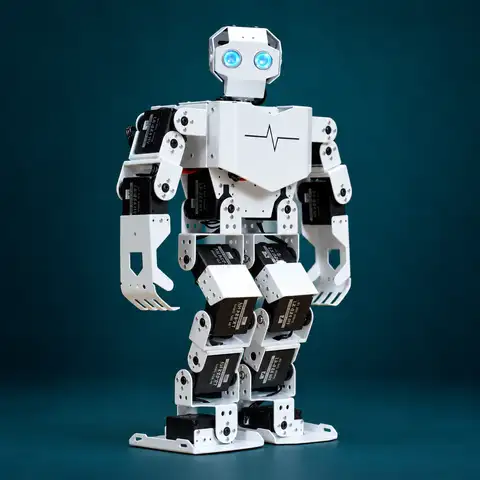
TonyBot lets holders of $TONY control Tony, one physical humanoid robot. You connect a wallet and type a prompt. An AI planner turns it into a short list of safe actions. A Raspberry Pi strapped to the robot runs those actions on the servos, speaks out loud, and reports back. Everyone watches it happen on the live feed.
There are three kinds of thing the robot can do from a prompt:
- Move. Walk, turn, wave, bow, dance, kick, squat, and any custom routine you record.
- Talk. Say a line out loud through a speaker on the robot, with a speech bubble on the stream.
- Trade. Buy or sell a token from the robot's own treasury wallet, inside hard limits.
Prompts can combine all three: “buy 0.1 SOL of $TONY, then dance and say we're so back” becomes one command with three steps.
How a prompt runs
Every prompt follows the same five steps, from the button press to the servo moving.
You sign a free message to prove the wallet is yours. The API reads your token balance on-chain.
The planner turns the prompt into JSON steps using only actions from the allow-list.
The safety layer rejects unknown actions, unsafe sequences, over-limit trades and banned words.
The command joins a first-in, first-out queue. One command runs at a time.
The Pi picks it up, drives the servos, speaks, and reports each step back live.
Users never talk to the robot directly. The browser only talks to the API, and only the Pi talks to the robot. That keeps the robot off the public internet and makes the planner the only way in.
The robot
The robot is a Hiwonder Tonybot, a 17-degree-of-freedom biped with an aluminum alloy frame. It ships with more than ten preset action groups, including walking, dancing and gymnastics.
The servo controller runs coordinated joint movement. The ESP32 side handles sensors and expansion. The Raspberry Pi sits on top as the “brain” that connects the whole thing to the internet.
| Servo ID | Joint | Side |
|---|---|---|
| 1 – 5 | Ankle roll, ankle pitch, knee, hip pitch, hip roll | Right leg |
| 6 – 10 | Ankle roll, ankle pitch, knee, hip pitch, hip roll | Left leg |
| 11 – 13 | Shoulder pitch, shoulder roll, elbow | Right arm |
| 14 – 16 | Shoulder pitch, shoulder roll, elbow | Left arm |
| 17 | Head pan | Center |
Servo IDs above are the layout the console uses. Moves are triggered as saved action groups, so the bridge never addresses single servos. Record or edit groups in Hiwonder's PC software.
Raspberry Pi bridge
The bridge is a small Python service on the Pi. It checks the TonyBot API for the next command, turns each step into something physical, and reports back.
What you need
- Raspberry Pi 4 or 5 with Raspberry Pi OS (64-bit).
- USB data cable from the Pi to the Tonybot servo controller.
- A small USB or 3.5 mm speaker for speech.
- A USB webcam or Pi camera for the stream, pointed at the robot.
- Separate power for the Pi. Don't run it off the robot's 11.1 V pack.
Install
# on the Pi
sudo apt install -y python3-pip espeak-ng
pip install requests pyserial --break-system-packages
mkdir ~/tonybot && cd ~/tonybot
curl -O https://tonybot.fun/bridge/bridge.py
curl -o .env https://tonybot.fun/bridge/.env.example
nano .env                  # paste your BRIDGE_TOKEN
python3 bridge.py --sim    # test without the robot
python3 bridge.py          # robot plugged in over USB
What the bridge does
Every second it asks the API for the next command. For each step it runs the saved action group on the servo controller, speaks through the speaker, or asks the server to run the trade. Every 3 seconds it sends a heartbeat. The core of the servo call:
# Hiwonder controller frame: 0x55 0x55 | length | command | params
def run_group(group, times=1):
    frame = bytes([0x55, 0x55, 0x05, 0x06, group]) + struct.pack("<H", times)
    serial_port.write(frame)
This is Hiwonder's standard bus-controller command for running a saved action group. Check the baud rate against your Tonybot manual. If your kit drives motion through the ESP32 board instead, change run_group in bridge.py and keep the rest.
The heartbeat carries battery voltage, Pi temperature and posture. If no heartbeat arrives for 20 seconds, the site shows the robot as offline and refuses new commands. A command stuck for 90 seconds is marked failed so the queue keeps moving.
Command format
This is the exact JSON the Pi receives. The planner is forced to output this shape, so the bridge never has to interpret free text.
{
  "id": "5f0c2e1a-…",
  "wallet": "7xKX…9fQe",
  "prompt": "wave and say gm, then buy 0.1 SOL of $TONY",
  "steps": [
    { "type": "motion", "action": "wave",  "group": 3, "repeat": 1, "duration_ms": 2400 },
    { "type": "speak",  "text": "gm", "voice": "tony" },
    { "type": "trade",  "side": "buy", "token": "TONY", "amount_sol": 0.1 },
    { "type": "motion", "action": "celebrate", "group": 9, "repeat": 1, "duration_ms": 2600 }
  ]
}| Step type | Fields | Limits |
|---|---|---|
| motion | action, group, repeat, duration_ms | Action must be in the library. Max 4 repeats, max 6 motion steps. |
| speak | text, voice | 140 characters. Filtered for slurs, doxxing and spam links. |
| trade | side, token, amount_sol | One trade per command. Capped per trade and per hour. |
A whole command is capped at 20 seconds of robot time, so nobody can hold the robot for long.
Motion library
Each motion is an action group: a saved sequence of servo positions recorded in Hiwonder's PC software and stored on the controller. The planner can only pick from this list. To add a move, record it in a free group number and add it to the ACTIONS list in the API.
| Action | Group | Length | What it does |
|---|
Speech
When a step says speak, the Pi turns the text into audio and plays it through the robot's speaker. It uses espeak-ng out of the box, or Piper for a more natural voice if you set PIPER_MODEL. The same text appears as a speech bubble on the stream so viewers without sound can follow along. A short head-nod motion plays while it talks.
With an AI key added on the server, the planner understands free-form prompts and answers questions (“what's your favorite coin?”) in Tony's voice. Without one, it uses built-in rules that understand the move names, “say …”, and “buy/sell X SOL of …”.
Trading
The robot has its own Solana wallet, called the treasury. The owner funds it. When a prompt asks for a trade, the API executes it from the treasury through a swap aggregator, then the robot performs a reaction on camera.
- Your wallet is never used for trades. You only sign a free sign-in message. The robot trades its own money.
- The treasury key lives on the API server, in a secrets manager. It is never on the Pi and never in the browser.
- Hard limits: 0.25 SOL per trade and 2 SOL per hour by default. Swaps route through Jupiter with 3% max slippage.
- Trades are simulated until the owner turns trading on and adds the treasury key as a server secret. The robot can trade the project token or any mint address a holder pastes.
Running a wallet that trades on public instructions can carry legal and tax obligations depending on where you operate. Check that before you switch trading on, and keep the caps low while you learn how people use it.
Safety
This is a real machine on a real table. Prompts never reach the servos directly: the Pi only runs saved action groups the owner recorded.
| Guard | Where | What it stops |
|---|---|---|
| Allow-list | API | Any motion that isn't a saved action group. Raw servo angles are never accepted from prompts. |
| Sequence rules | API | More than 6 motions, 2 speech lines or 1 trade per command. |
| Robot time cap | API | A command can hold the robot for at most 20 seconds. One stuck for 90 seconds is marked failed. |
| Stop | Pi | Ctrl-C on the bridge stops the current action group immediately. With the bridge off, the robot shows offline and commands are refused. |
| Speech filter | API | Slurs and links are stripped from chat and from anything the robot says. |
| Rate limit | API | One queued prompt per wallet at a time, five per wallet per hour. Commands are refused while the robot is offline. |
Prompts that ask for something unsafe (“jump off the table”, “fall over”) are rejected before they reach the queue.
Holding & access
There is no fee per prompt. Access is based on what you hold.
- Chat: anyone who connects a wallet and signs the sign-in message.
- Command the robot: wallets holding at least 1 $TONY. The server reads your balance on-chain when you send a command, so selling drops access right away.
- Signing in is free. You sign a plain text message. No transaction is sent and nothing leaves your wallet. The session lasts 7 days.
- Works with Phantom, Solflare and Backpack. On mobile, the site opens inside the wallet's own browser.
API
The site and the Pi both talk to one small API. Live updates (chat, queue, robot status) stream to every viewer over a realtime database channel.
| Endpoint | Who calls it | Purpose |
|---|---|---|
| POST /login | Browser | Verify a signed sign-in message, return a session and your holder status. |
| GET /me | Browser | Re-check your token balance. |
| POST /chat | Browser | Send a chat message. Signed-in wallets only. |
| POST /command | Browser | Holder check, safety check, plan, then queue the command. |
| GET /treasury | Anyone | Treasury balance and 24h trade count. |
| POST /bridge/heartbeat | Raspberry Pi | Battery, temperature, posture. Keeps the robot shown as online. |
| POST /bridge/claim | Raspberry Pi | Take the next queued command. |
| POST /bridge/step · speak · trade · finish | Raspberry Pi | Report progress, post speech, run a trade from the treasury, close the command. |
The video feed is a separate stream from the Pi's camera (HLS through a service like Cloudflare Stream or Livepeer, or a YouTube live embed). Its link is stored in the database, so changing it updates every open page.
FAQ
Can I make it do anything at all?
Anything the motion library, speech and trading can express. The planner maps your words to the closest safe actions. If nothing fits, the robot says something back instead of moving.
What happens if two people send at once?
Both go in the queue in the order the API received them. The queue panel shows your place.
What if the robot falls over?
The owner stops the bridge, stands Tony back up and restarts it. While the bridge is off the robot shows offline and new commands are refused.
Is the trading real?
Yes, once the owner switches it on. Until then trades are simulated and say so in chat.
Why does the stream say “Booting Tonybot”?
That screen shows until the camera stream is connected. When the owner sets the stream link, the video replaces it on every open page. If the stream drops, the page retries every 10 seconds.
Why can't I send a command?
Either you don't hold enough of the token, you already have a command waiting, you've hit 5 commands this hour, or the robot is offline. The message you get says which one.